
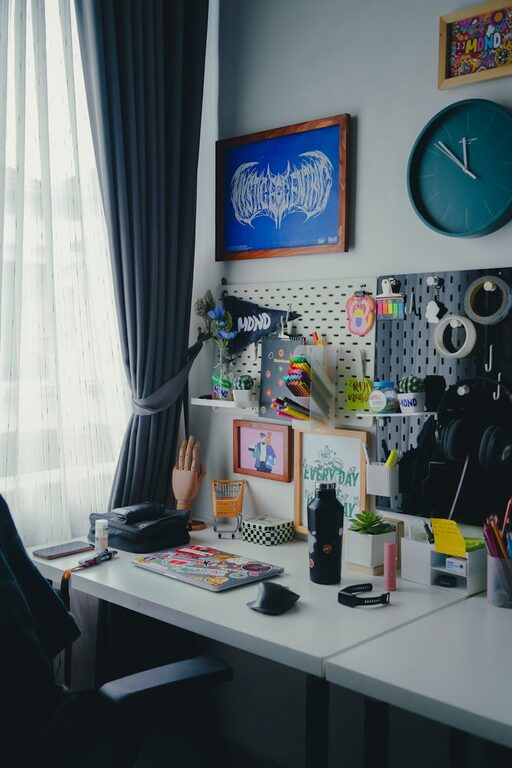
Creating an efficient and comfortable desk setup is essential for maintaining focus and productivity throughout your workday. Whether you work from home or in an office, a thoughtfully organized workspace can reduce fatigue, minimize distractions, and promote better posture. In this post, we’ll explore practical tips to help you design a desk setup that supports both focus and comfort.
Why Your Desk Setup Matters
Your desk isn’t just a place to put your computer—it’s the foundation of your working environment. A cluttered or poorly arranged workspace can lead to discomfort, decreased motivation, and even long-term health issues such as back or neck pain. Conversely, a well-planned desk setup can encourage efficient workflows, reduce stress, and improve overall well-being.
Choosing the Right Desk and Chair
Desk Height and Surface
Start by selecting a desk that fits your body height and work habits. A standard desk height of about 29 to 30 inches suits most people, but this can vary. Consider an adjustable desk or a sit-stand desk if you want more flexibility.
Make sure the surface is large enough to hold your essential items comfortably without crowding. A clean, spacious desk gives you room to organize materials and helps you avoid feeling overwhelmed.
Ergonomic Chair
Invest in a comfortable, adjustable chair that supports your lower back. Look for features like:
– Adjustable seat height
– Lumbar support
– Adjustable armrests
– Comfortable padding
Proper chair support encourages good posture and reduces strain during long work sessions.
Monitor Placement for Eye Comfort
Position your monitor so that the top of the screen is at or slightly below eye level. This angle helps prevent neck strain and keeps your head in a neutral position. Your monitor should be about an arm’s length away from your eyes to minimize eye fatigue.
If you use multiple monitors, arrange them to avoid excessive head turning. A curved or dual monitor stand can help maintain alignment.
Keyboard and Mouse Positioning
Place your keyboard and mouse close enough so that your elbows stay near your body, forming about a 90-degree angle. Your wrists should remain straight and relaxed while typing or mousing to reduce the risk of repetitive strain injuries.
Consider using a wrist rest to provide additional support, but avoid resting your wrists on the desk or rest while typing.
Lighting Matters
Good lighting reduces eye strain and helps maintain alertness. Aim for a mix of natural and artificial light:
– Position your desk near a window for natural daylight but avoid glare on your screen.
– Use adjustable desk lamps with warm, soft light for evening hours.
– Avoid overhead fluorescent lights if they cause discomfort.
Balanced lighting reduces shadows and eye fatigue.
Keep Essentials Within Reach
Organize your desk so the items you use frequently—like pens, notebooks, or headphones—are easily accessible. Use desk organizers, drawers, or small trays to keep things tidy and prevent clutter. Having everything within arm’s reach saves time and keeps your focus on work rather than searching for tools.
Add Personal Touches Wisely
While too much decoration can be distracting, a few personal touches can create an inviting and motivating workspace. Consider adding:
– A small plant for a splash of greenery
– A favorite photo or artwork
– Inspirational quotes or a vision board
These items should inspire you without overwhelming the space.
Maintain Good Posture
Maintaining good posture is crucial for long-term comfort. When seated:
– Keep your back straight and shoulders relaxed
– Your feet should rest flat on the floor or on a footrest
– Avoid crossing your legs for better circulation
Regular posture checks remind you to adjust your sitting position and reduce strain.
Take Breaks and Move Regularly
Even the best desk setup can’t replace the benefits of movement. Take short breaks every hour to stand, stretch, or walk around. This helps reduce muscle stiffness and refreshes your mind, enhancing focus when you return to work.
Cable Management
Tidy cables enhance your desk’s aesthetics and prevent accidental disconnections or tripping hazards. Use cable clips, sleeves, or under-desk trays to organize wires. Keeping cables neat reduces visual clutter, which can help your mind stay clear.
Keep It Clean and Clutter-Free
Regular cleaning and decluttering of your desk help maintain a pleasant work environment. Set aside a few minutes each day to tidy up your workspace. This habit supports mental clarity and keeps your focus sharp.
Conclusion
Setting up your desk for focus and comfort requires attention to ergonomics, lighting, organization, and personal preferences. By making thoughtful adjustments, you create a workspace that supports your productivity and well-being. Remember, small changes can make a big difference in how you feel and perform every day. Start implementing these tips today and enjoy a more comfortable, focused work experience.